 Auricast Manuals
History
History is the as-aired log: what actually played, with real times. Anyone signed in can read it. Open it from the bottom bar.
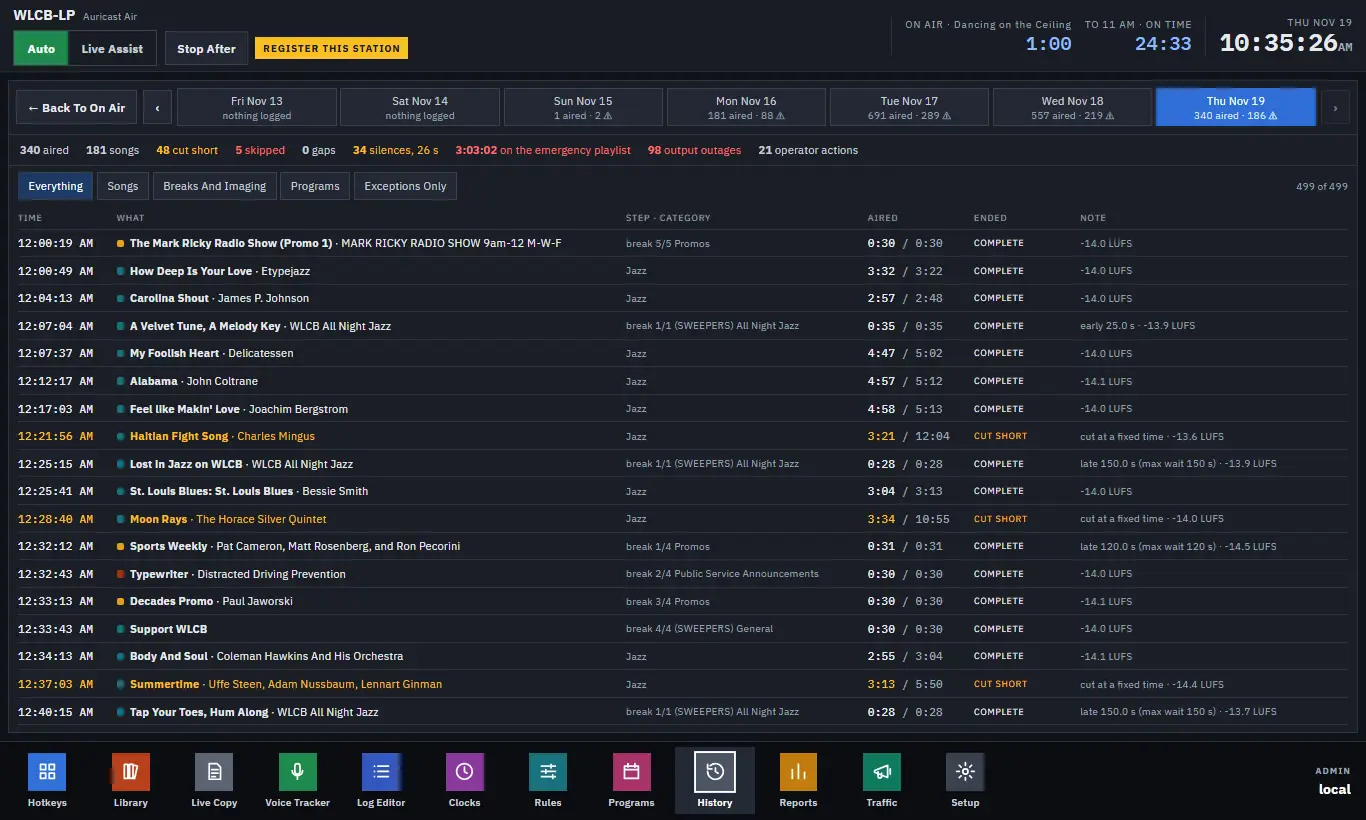
Choosing A Day
A strip along the top shows the last 7 days. Each says how many items aired and how many exceptions it had (marked with a warning sign), or "nothing logged". Press a day to open it. ‹ and › move a week back or forward.
Totals
Above the table are the day's totals: items aired, songs, cut short, skipped, gaps, silences, time on the emergency playlist, output outages and operator actions. Figures that mean trouble are colored.
The Filters
| Filter | Shows |
|---|---|
| Everything | Every entry. |
| Songs | Songs only. |
| Breaks And Imaging | Breaks, IDs, sweepers. |
| Programs | Shows and their parts. |
| Exceptions Only | Only what went wrong, with operator actions. |
The Table
| Column | Meaning |
|---|---|
| TIME | When it really started. A ▲ or ▼ means it was 30 seconds or more later or earlier than planned. Hold the pointer over it for the planned time. |
| WHAT | Title and artist. |
| STEP · CATEGORY | Where it came from. |
| AIRED | How long it played, against its full length. |
| ENDED | complete, cut short, on air or no end logged (the station stopped under it). |
| NOTE | Early, late, cut at a fixed time, dropped, a break note, and the loudness it aired at. |
Between items you see events: skipped items ("would not load"), silence on the output, gaps between items, the emergency playlist going on and off, outputs going down, and operator actions with who did them. Amber means worth a look; red means something failed.
A song cut at a fixed time, such as a break at :30, is a normal exception and not a fault.
Looking For A Problem
- Open the day and choose Exceptions Only.
- Find the time. Silence, gaps and Output down say what happened and for how long.
- Switch to Everything to see what was around it.
Nothing on this screen changes anything. It only reads the log.