 Auricast Manuals
How Programming Fits Together
This manual is for the person who decides what the station plays and when. In Auricast Air that is the Program Director. An Admin can do everything a Program Director can; an Operator can look at all of it but not change it; the Traffic Manager sees only traffic.
Programming in Auricast is built in layers. Each layer answers one question, and none of them needs to know the details of the others.
| Layer | Question it answers | Where you work |
|---|---|---|
| Library and categories | What do we have, and how is it grouped? | Library, Setup → Categories |
| Track settings | When may this track play, and where do its intro and ending fall? | Library (the track editor) |
| Rules | Which track from a category goes next? | Rules |
| Clocks | What kind of thing goes where in an hour? | Clocks |
| Week grid | Which clock runs in which hour of which day? | Clocks → Week And Top Of The Hour |
| Timed Events | What must happen at an exact time, whatever clock is running? | Setup → Timed Events |
| Voice Sets and Weather | What does an announcement of the time or temperature sound like? | Setup → Voice Sets, Setup → Weather |
| Programs | Are this week's show files in, and are they the right length? | Programs |
| Log Editor | What exactly will play in this hour, and can I change it? | Log Editor |
The idea in one paragraph
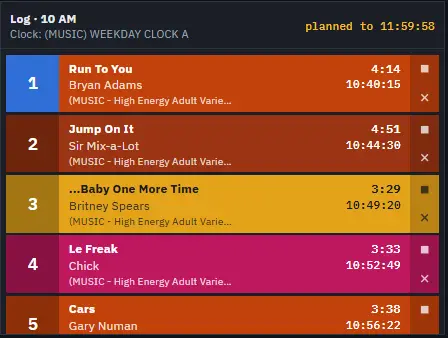
A clock is a recipe for one hour: "a song from Gold, a song from Current, a legal ID at the top, a song, a break at :30". It names categories, not songs. The week grid says which clock runs at 3 p.m. on Tuesday. When an hour comes up, Auricast plans it: for each step it asks the rules which track from that category is next, checks the track's own dates and hours, and lays the result out in time. That plan is the log. You can see it in On Air and change it in the Log Editor.
Why it is split this way
Because clocks name categories instead of songs, you can add a song to a category and it joins the rotation at once, with no clock to edit. Because rules sit with the category, "no same artist within two hours" is stated once instead of in every clock. And because the plan is made ahead, you can look at tomorrow before it happens.
When a change takes effect
- Rules, categories and track settings are taken by playout straight away, and the log ahead is planned again.
- Clocks, sequences and the week grid: a saved change reaches the hours not yet on air. The hour on air plays as it was planned. Hours that were saved by hand in the Log Editor keep what they were saved with (see The Log Editor and Saved Hours).
- Which files are in which category changes at the library's next scan, within a minute.
A suggested order for a new station
- Make your categories and point them at folders (The Library and Categories).
- Set the station's separation rules (Rules).
- Check that your music has sensible markers (Markers).
- Build a clock for each kind of hour (Clocks).
- Fill the week grid (The Week Grid, Dated Hours and Timed Events).
- Set the top of the hour and speed range (Fixed Times and Hour Timing).
- Look at tomorrow in the Log Editor and fix what you do not like.