 Auricast Manuals
The Deck
The deck is the large panel at the upper left of On Air. It shows the item that is playing now, with everything you need to talk over it or time a break.
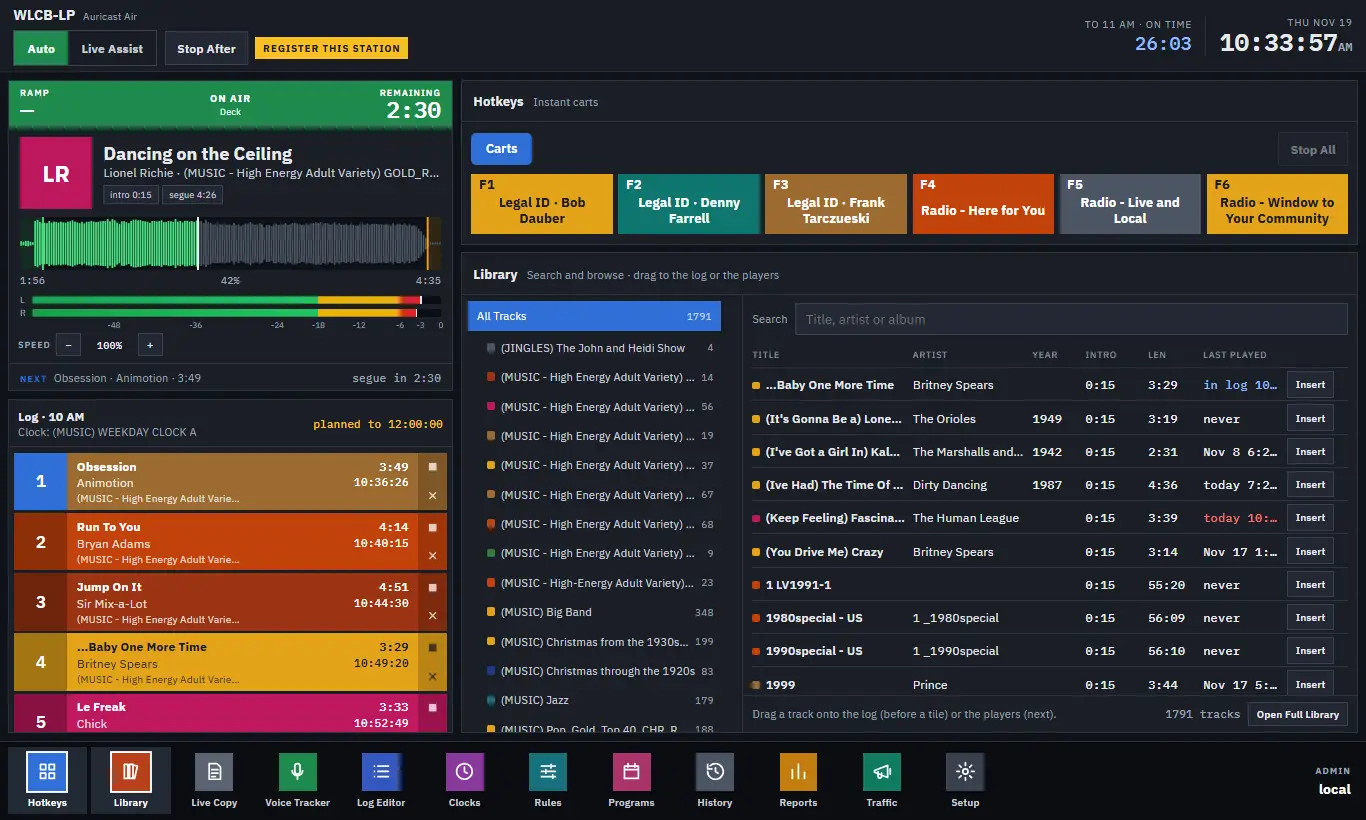
What The Deck Shows
The deck shows one item at a time:
- the item on air;
- while one item plays out under the next, the one ending;
- in Live Assist between items, the next item, loaded and waiting for Play.
A label in the middle of the colored bar says which: ON AIR, ENDING, NEXT or CUED. When a new item takes over, the deck slides it in from the right as the old one leaves to the left.
| Part | What it tells you |
|---|---|
| RAMP (left of the bar) | The time left in the intro: how long you can talk before the vocals start. It shows a dash if the track has no intro marked. |
| REMAINING (right of the bar) | The time left in the item. |
| Cover art | The picture in the file's tags, or a tile with the artist's initials when there is none. |
| Title, then artist, year and category | What is playing. |
| Chips | Small labels: the speed it is playing at (for example +2.4%), HAND if you set that speed by hand, intro with its length or "not set", segue with the time where the next item starts, and the step it came from. |
| Waveform | The sound of the item. Played parts are bright, the rest dim. The intro is shaded green, the tail after the segue is amber, and a white line marks now. |
| Elapsed, percent, length | Under the waveform. |
| Level meters | The output level. |
| NEXT line | At the bottom: the next item, its length, and how long until it comes in (segue in). |
The deck flashes over the last few seconds of an item. How many seconds is a station setting (5 by default). With reduced motion set on your PC, it outlines instead of flashing and nothing slides.
Ramp
Ramp is the number a talker watches. A song with a 12-second intro shows RAMP 0:12 at the start and counts to zero as the vocals begin. If you talk during the ramp and stop before it reaches zero, you do not talk over the singer. A song with no intro marked shows a dash and the chip says "intro not set". Marking intros is the Program Director's job; see The Library for how the markers look.
Changing A Song's Speed By Hand
Music in the log can be played a little faster or slower to land the hour on time, and Auricast normally does that by itself. If a song has room to move, the deck shows SPEED with − and + buttons.
- Press + to speed it up or − to slow it down. Each press is 0.5 percent, within the range your station allows. The buttons stop at the limits.
- The chip then shows HAND: Auricast will not change that song's speed again.
- Press Auto to hand the song back to the hour's timing.
Speech, spots, breaks and show segments are never changed.
Dropping A Track On The Deck
Drag a track from the Library onto the deck and it goes next: it is put in the first open place in the log. Operators are held back from putting items very close to air; see Editing The Log.
The Deck And The Log
The deck shows what is playing; the log column below it starts with the next item. The log's numbers start at 1 for the next item and count up. In Live Assist, while the deck is showing the next item waiting for Play, that item stays number 1.