 Auricast Manuals
Backups, Restore And System
Backups
Auricast makes a backup of the station's settings every day. You choose the time and how many to keep under Setup → Mounts & Folders → Folders → Backups: press Change, and set the folder, Daily At and Keep (1 to 365).
What A Backup Holds
- The station folder: the grid, clocks, categories, markers, play history, carts, now playing, studios, recording and report settings, and Stereo Tool presets (with which programs are on).
- The as-aired log.
What It Does Not Hold
- The music. It stays where it is. Back up your audio separately.
- Passwords and keys. The mail password, Stereo Tool keys and Thimeo's library are not in a backup. After a restore, enter them again.
How It Works
Each backup is one file named auricast-<station>-<date>-<time>.tar.gz. It is written under a temporary name, read back in full to prove it is complete, and only then renamed into place. The newest ones, as many as Keep says, are retained and older ones removed.
A backup that fails is logged and mailed, and so is the first one that works again afterwards. The Overview section shows the newest backup and when it was made. See Email and Alerts.
Restore
Restoring is done on the box, not in the browser, so that it can never overwrite a live station by accident. A restore unpacks into a folder that is empty or new:
air-playout --restore <backup file> --to <new folder>It prints where the restored station folder and log are, so you can point the station at them. A restore into a folder that already holds files is refused, and an entry that tries to write outside the folder is refused.
After restoring, enter the keys and passwords again (mail, Stereo Tool, Ingest jobs).
System
Setup → System is open to everyone who can open Setup. It holds:
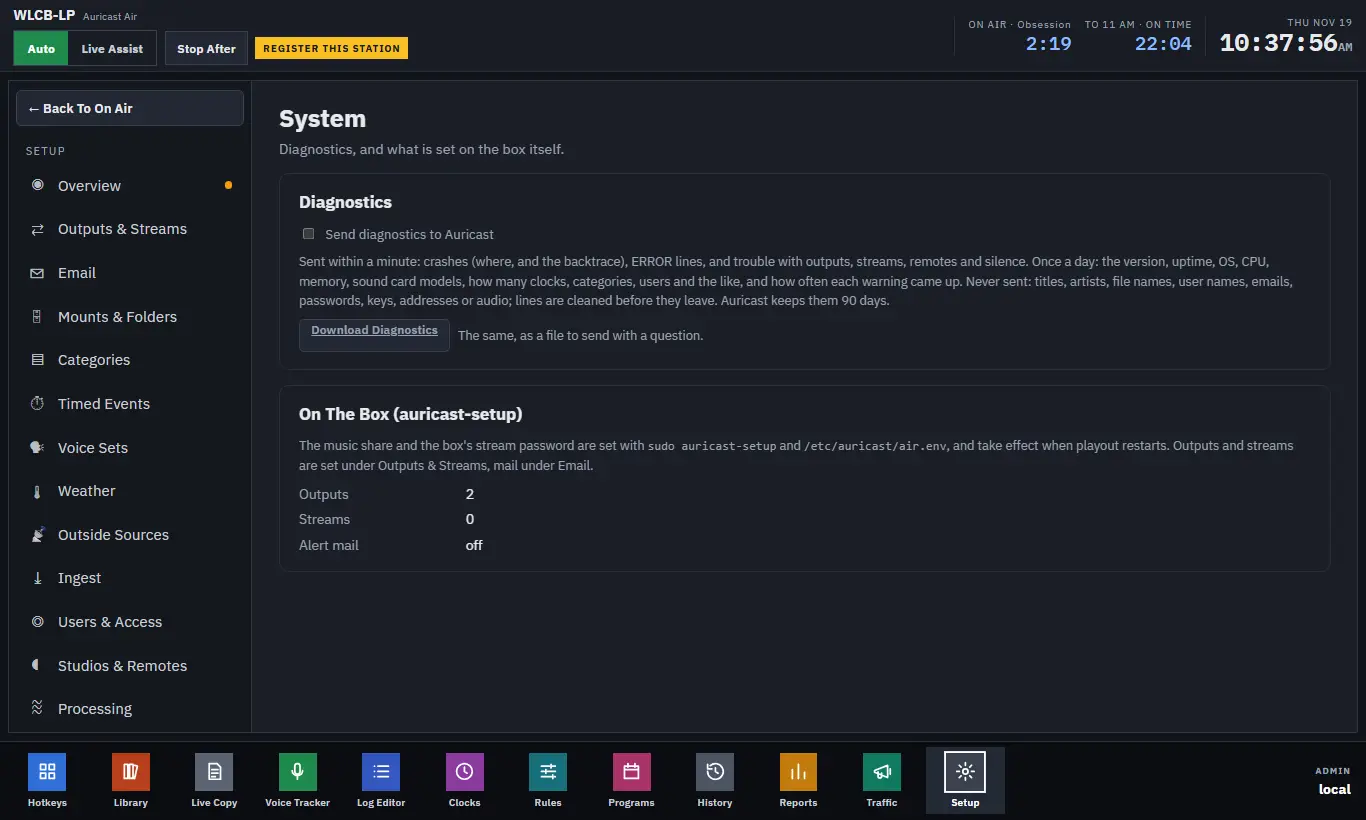
Diagnostics
Admins can choose Send Diagnostics To Auricast. It is optional and off until you tick it, and it only starts once the station is registered.
- Sent within a minute: crashes (where they happened, with a backtrace), error lines, and trouble with outputs, streams, remotes and silence.
- Sent once a day: the version, uptime, operating system, processor, memory, sound card models, how many clocks, categories and users there are, and how often each warning came up.
- Never sent: titles, artists, file names, user names, e-mail addresses, passwords, keys, addresses or audio. Lines are cleaned before they leave. Auricast keeps them 90 days.
Download Diagnostics gives you the same information as a file, to send with a question to support.
On The Box
This card says what is set on the server itself: the music share and the box's stream password are set with sudo auricast-setup and the box's settings file, and take effect when playout restarts. It counts your outputs and streams and says whether alert mail is on. Outputs and streams are set under Outputs and Streams, and mail under Email and Alerts.
A Daily Check
- Open Setup → Overview. Are all output and stream dots lit?
- Is the newest backup from last night?
- Is any library location marked unavailable?
- Do any Ingest jobs show Failing?
- Is Alert mail on?