 Auricast Manuals
Announcements, Voice Sets and Weather
An announce step says the time, the date or the temperature in words, built as it is about to play from a station's own recordings, a bought voice pack, or speech generated by a service.
The announce step
In a clock, add an announce step and choose what it says:
| Choice | Example |
|---|---|
| Time | "It's 3:42" |
| Date | "Tuesday, November 18th" |
| Time And Date | Both together |
| Temperature | "It's 41 degrees" |
| Time And Temperature | "It's 3:42 and 41 degrees" |
Then choose its Voice set (the first set is used if you leave it) and, optionally, a Bed to play under the voice (Voiceovers, Beds, Up Next and Hooks).
The words are put back to back with no gaps, using the time the item will actually start, not the time it was planned. The log shows it as, for example, Time: 3:42 PM. If a needed word is missing, the step is skipped and logged with the missing word, never played half.
Voice sets
A voice set is a folder of short recordings, one per word. Manage them in Setup → Voice Sets (Program Directors and Admins).
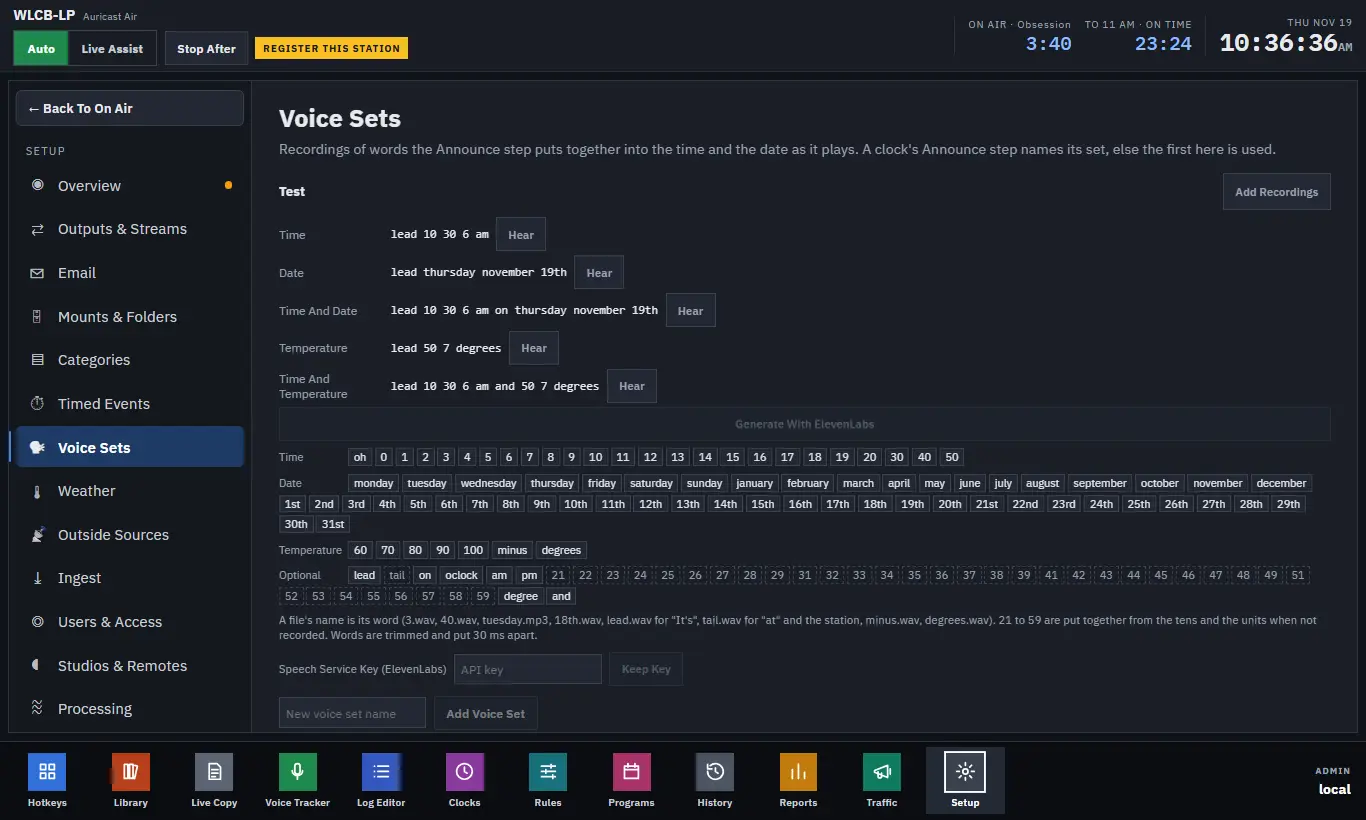
For each set the screen shows each announcement it can make, what that says right now, and a Hear button to play it. Below are the words, grouped as Time, Date, Temperature and Optional. A word that is recorded is lit; one that is missing is not.
To add or replace a word, click it and choose an audio file. Or click Add Recordings to choose many files at once: each file's name is its word (3.wav, 40.wav, tuesday.mp3, 18th.wav, lead.wav for "It's", tail.wav for the station's name, minus.wav, degrees.wav). A recording is kept only if it decodes, is not silent, and is ten seconds or less. Add Voice Set makes a new set.
You need the numbers 0 to 59 (or just 0 to 20 and 30, 40, 50: the rest are put together), the days, the months, and the ordinals 1st to 31st. lead, tail, oclock, am and pm are optional. A bought pack that names its files differently can be mapped to words, and one that has a file per minute (such as TIME_0342) is used when that file is there and built from words when not. Ask your Admin or the pack's maker for the mapping file.
Generating a voice with ElevenLabs
If you have no recordings, a set can be generated with the station's own ElevenLabs key.
- In Setup → Voice Sets, enter the key under Speech Service Key (ElevenLabs) and click Keep Key. It is stored apart from other settings and never shown back. Forget Key removes it.
- Under a set, click Generate With ElevenLabs.
- Choose a Voice from the list, and a Tail (what is said after each announcement, such as "on WLCB", or empty for none).
- Whole Phrases makes the time, the date and the temperature as complete phrases, which sound better than words joined together. It makes about 16,000 characters of speech once, then one new date a day. Words only is under 1,000 characters. Tick Temperatures In Celsius if needed.
- Click Save And Generate.
Files are made ahead, in the background, and kept, so an announcement never waits for the service and still plays when the service is down. The set shows how many files are still to make and the last error. Generate Now nudges it, Change edits the choices, and Stop Generating stops it (what was made stays). If the key or service fails, an alert is mailed (once a day while it lasts) and the set plays what it has. Generated speech uses your allowance with the service.
Weather
The temperature comes from Setup → Weather.
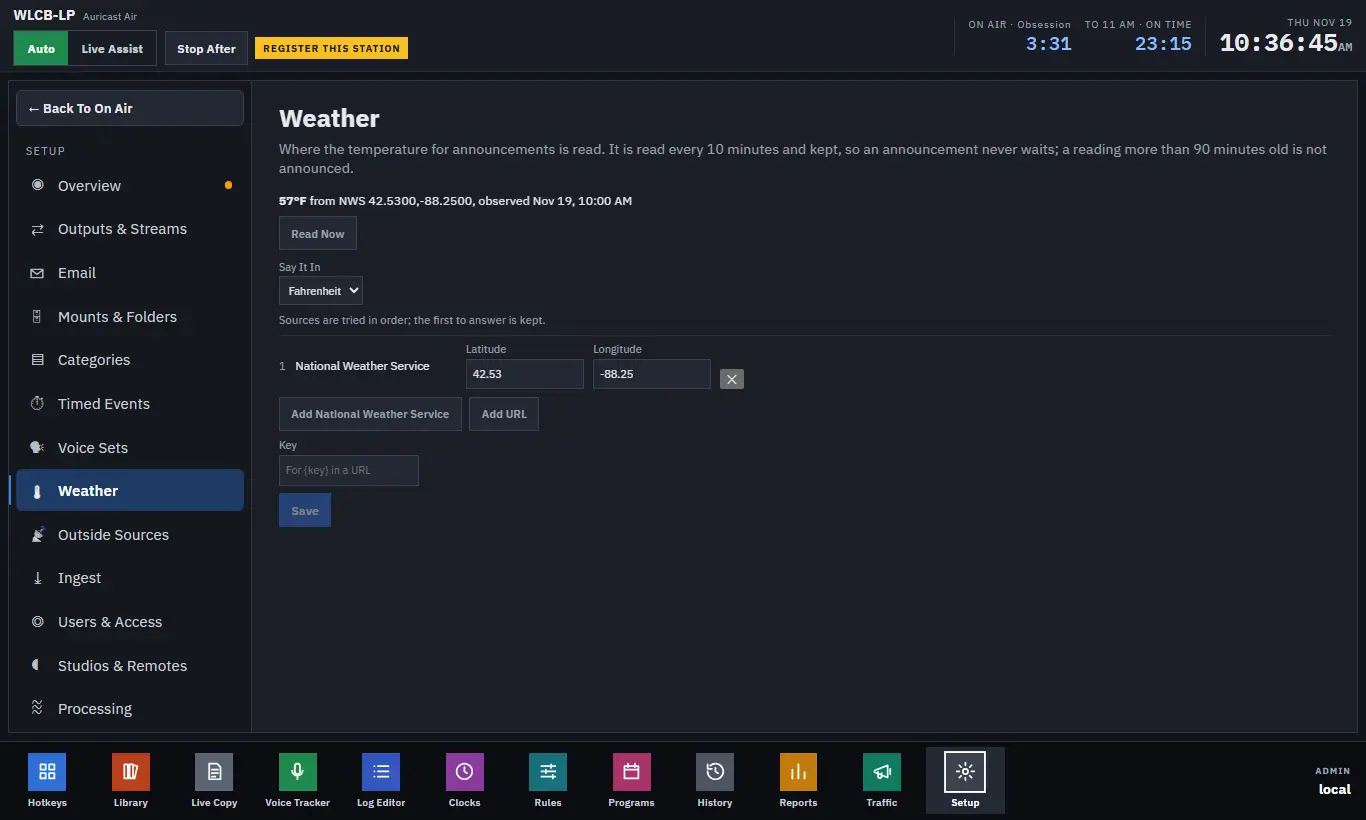
- The top shows the last reading, where it came from, and how old it is. If it is too old to announce, it says why. Read Now reads it immediately.
- Say It In: Fahrenheit or Celsius.
- Add up to four sources, tried in order; the first to answer is kept: - Add National Weather Service: enter the Latitude and Longitude. It needs no key and uses the nearest observation station. - Add URL: any service that gives JSON or a plain number. Set the JSON Pointer to where the temperature is (for example
/main/temp; empty takes the first number), and Its Unit. A{key}in the URL is replaced by the Key field, which is stored apart and never shown back. - Click Save; it reads straight away.
Readings are taken every 10 minutes and kept, so a slow source never holds up a step. An observation up to 90 minutes old is still announced, because the National Weather Service observes about once an hour; older than that, the temperature steps are skipped and logged. If no source answers for an hour, an alert is mailed once, and again when readings return.