 Auricast Manuals
Fixed Times and Hour Timing
Some things must happen at an exact time: the legal ID at the top of the hour, a news break at :30, a network join. Others should simply fit: the music before them should end where it needs to. This page covers both.
Fixed times on a step
In the clock's FIXED column, type a time as mm:ss in the hour (for example 30:00) on any step that plays something. Once a time is set, three more controls appear.
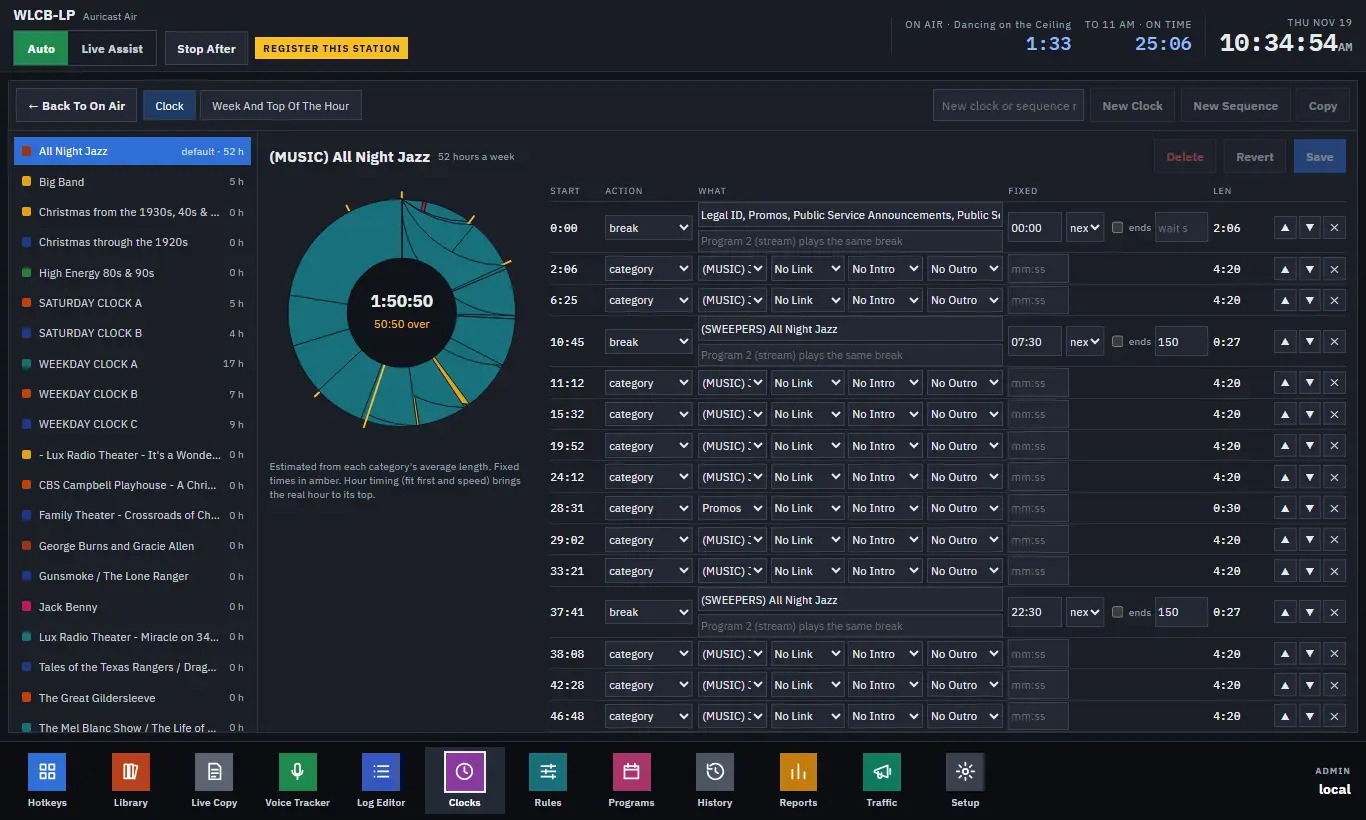
| Control | What it does |
|---|---|
| Mode: next | The item on air finishes, then the step starts. Anything planned before the step that did not get played is dropped. This is the default. |
| Mode: wait | Everything planned before the step plays first, up to the maximum wait. |
| Mode: now | Whatever is on air is cut at the time, with a 1.5 second fade, and the step starts on time. |
| wait s (maximum wait) | How many seconds past its time the step may be held back. A song still running then is cut. |
| ends | Backtimed: the step ends at the time instead of starting at it. A legal ID set to end at 60:00 starts early enough to finish at the top of the hour. |
What if the hour comes up short or long?
- Short: if the steps before a fixed time will finish early, Auricast fills the gap with the song that lands closest to the time, from the clock's own music. When there are fewer than 20 seconds to fill, the fixed step simply starts early.
- Long: the mode decides, as in the table above. A step that is dropped still fires its actions.
- A fixed step inside the hour starts early whenever the log reaches it first, so you do not need a special setting for "only if something is playing".
- A new hour is never skipped for being late: its first step always plays, even if the hour before ran over.
The top of the hour
The top of the hour is a fixed time of its own. Its settings live in two places: the station's, on the Clocks screen's Week And Top Of The Hour tab (The Station's Top Of The Hour, then Save Top Of The Hour), and each clock's own, at the bottom of the clock page ("blank: the station's"). A clock's setting overrides the station's, one setting at a time.
| Setting | What it does |
|---|---|
| Mode | next, wait or now, as above, for the top of the hour. Default next. |
| Max wait (s) | The longest the new hour may be held back by the one before. |
| May start early | When the hour before runs out early, start the next hour at once instead of filling. |
| Max early (s) | The most an hour may start early. |
| Max late (s) | Before the top, a song that would make the next hour start more than this late is dropped, if the music still to play could not win the time back by speeding up. The next hour then starts early. |
| When short | fill (fill to the top with music) or none (leave a planned, silent gap that is logged but not treated as dead air). |
| Fill from | The categories used to fill a gap when the clock has no music of its own. A show made of segments never fills from its own segments. |
| Slowest, Fastest | The speed range for music, such as 0.95 and 1.05 (95% to 105%). Leave both at 1 for no speed changes. |
| Fit first | On by default. See below. |
The common pattern: "Begin at the top of the hour no matter what, but wait at most two minutes" is mode next with a max wait of 120.
How Auricast lands an hour
Auricast uses these steps, in this order, so the gentlest wins:
- Fit first. When planning music before a fixed time, Auricast works out how long each song should be to fill the time evenly. From the next few songs the rules would allow, it takes the one whose length is closest. Rotation stays fair: a song is never picked over one that was played much longer ago.
- Speed. Music that is marked May change speed is played a little faster or slower, with the pitch kept, to land the time. The range comes from Slowest and Fastest. Spots, speech and show segments are never changed. The speed is worked out across the whole hour and adjusted as it goes.
- Dropping or starting early (Max late, May start early, Max early).
- Filling (When short, Fill from).
Speed aims at the top of the hour and at the fixed times inside it, using the music just before each.
On the On Air players, an operator can nudge the speed of an item by hand, in 0.5% steps, and return it to Auto. A song set by hand is left alone by hour timing. Hour timing never acts in Live Assist.
Tips for a show hour
In an hour built around a program, such as a one-hour show with a break at :30, make any timed event or announcement placed there next or give it a short maximum wait. Using now there will cut the show's segment at that moment and the rest of the hour will end up filled.