 Auricast Manuals
The Log Editor and Saved Hours
The log is the list of what will play. Auricast plans it ahead from the clocks. The Log Editor lets you read it for any day, change it by hand, and save hours so Auricast follows them exactly.
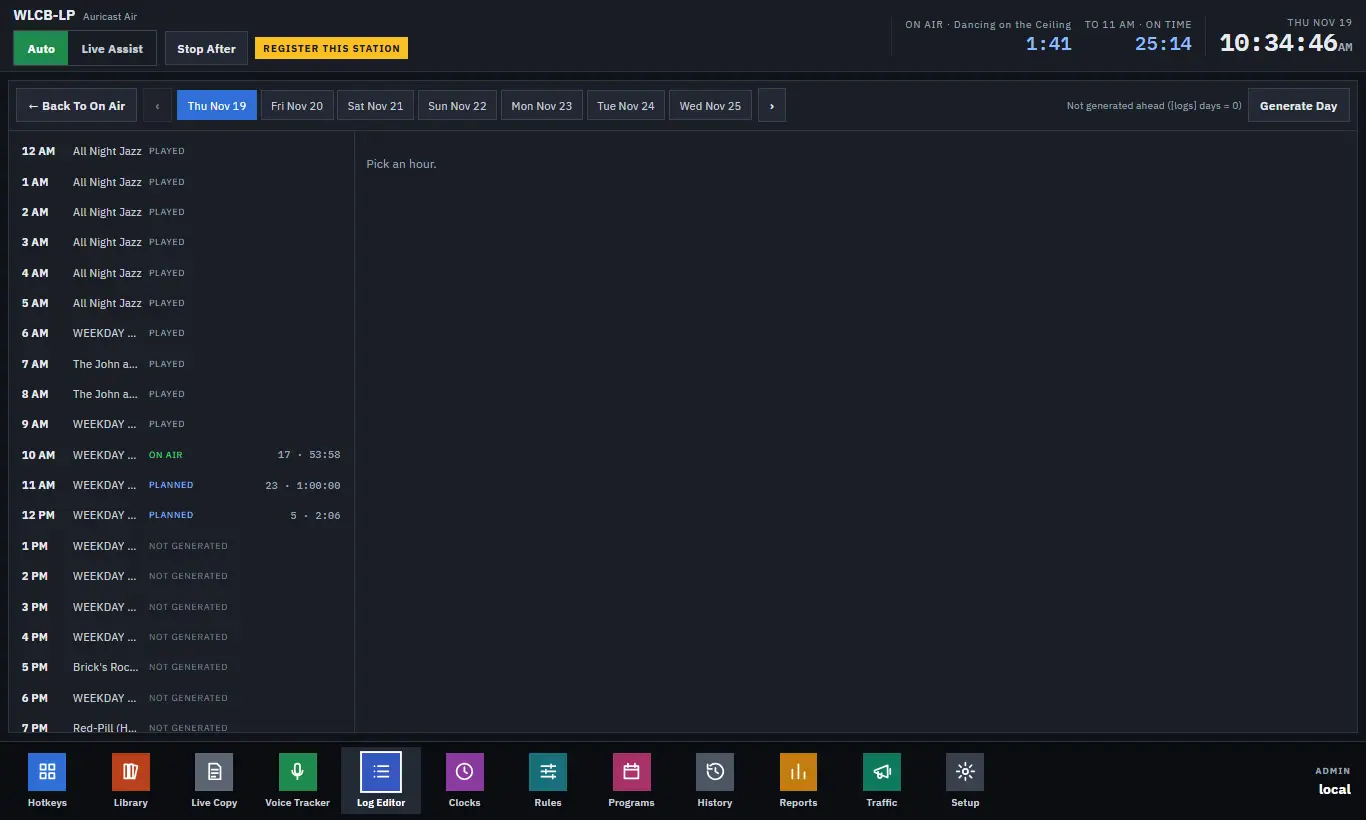
Reading a day
Across the top is a strip of days, with ‹ and › to move a week. Pick a day to see its 24 hours on the left. Each hour shows its clock, a status, and how many items it has and how long they run.
| Status | Meaning |
|---|---|
| played | It has aired. The table shows what aired with actual times, from History. |
| on air | It is on air now. |
| planned | In the live log, planned from its clock. |
| saved | Saved: Auricast follows it when the hour comes. |
| not generated | Nothing planned yet; its clock will be planned when the time comes. |
Pick an hour to see its items: START, TITLE · ARTIST, STEP (the clock step that produced it), LEN, and INTRO. A stopwatch mark by the time shows a fixed time. Notes appear as note rows and actions as small gear rows. A voice track slot shows as Voice Track, recorded or empty.
Editing an hour
Program Directors and Admins can edit anything that has not yet started. Operators may edit an hour that is more than ten minutes away. An item already handed to the players (the one on air and the next, once loaded) cannot be edited; use skip on the On Air screen for those.
Each editable row has buttons:
| Button | What it does |
|---|---|
| ▲ ▼ | Move the item earlier or later. |
| + | Insert a track before it. |
| 🎙 | Add a voice track slot before it. |
| ⇄ | Replace it with another track. |
| ✕ | Remove it. |
Insert At End adds to the hour's end. Insert and Replace open a Search the library panel: pick a track from it. Start times after the change are worked out again, and fixed times and the top of the hour adapt, filling or dropping as usual. Your hand-picked items bypass the separation rules and are not cut to make a fixed time: you chose them.
An edit in the live log saves the hours it touched, so a restart plays them as edited.
Saved hours
A saved hour is that hour's log, kept so Auricast follows it when it comes. It uses the clock's own steps, with the actual files in place of categories. Auricast still applies hour timing to a saved hour: it can change speed, start early, or cut at a fixed time, but the files stay.
Buttons for hours beyond the live log:
- Generate saves one hour from its clock. Generate Day (above) saves the whole day.
- Regenerate makes a saved hour again from its clock as it is now.
- Clear removes the saved log, so the clock plays again.
For an hour in the live log that has not begun, Regenerate Hour plans it from its clock as the grid has it now. The hours after it follow. Edits in it and after are dropped; a saved log for it is removed. Use it after changing a clock when you want the hour already planned to pick up the change. It asks you to confirm.
Generating runs the planner on a copy, from the end of the saved hours before it, so separation holds across them. An hour that is already saved is never generated over unless you ask.
Generating ahead automatically
The top right says how far ahead logs are generated: "Generated N days ahead, daily at hh:mm", or "Not generated ahead". Each station chooses; ask your Admin if you want it changed. With it off, only the hours you save by hand, and the live plan, exist.
Why use saved hours
- To check tomorrow before it airs and fix what you do not like.
- To lock in a special hour exactly.
- To prepare a holiday weekend in advance.
What aired is always kept in History, and the Log Editor shows it for played hours.