 Auricast Manuals
Voiceovers, Beds, Up Next and Hooks
These features make the music sound presented. They all use ordinary categories: you fill a category with recordings, and a clock step points at it.
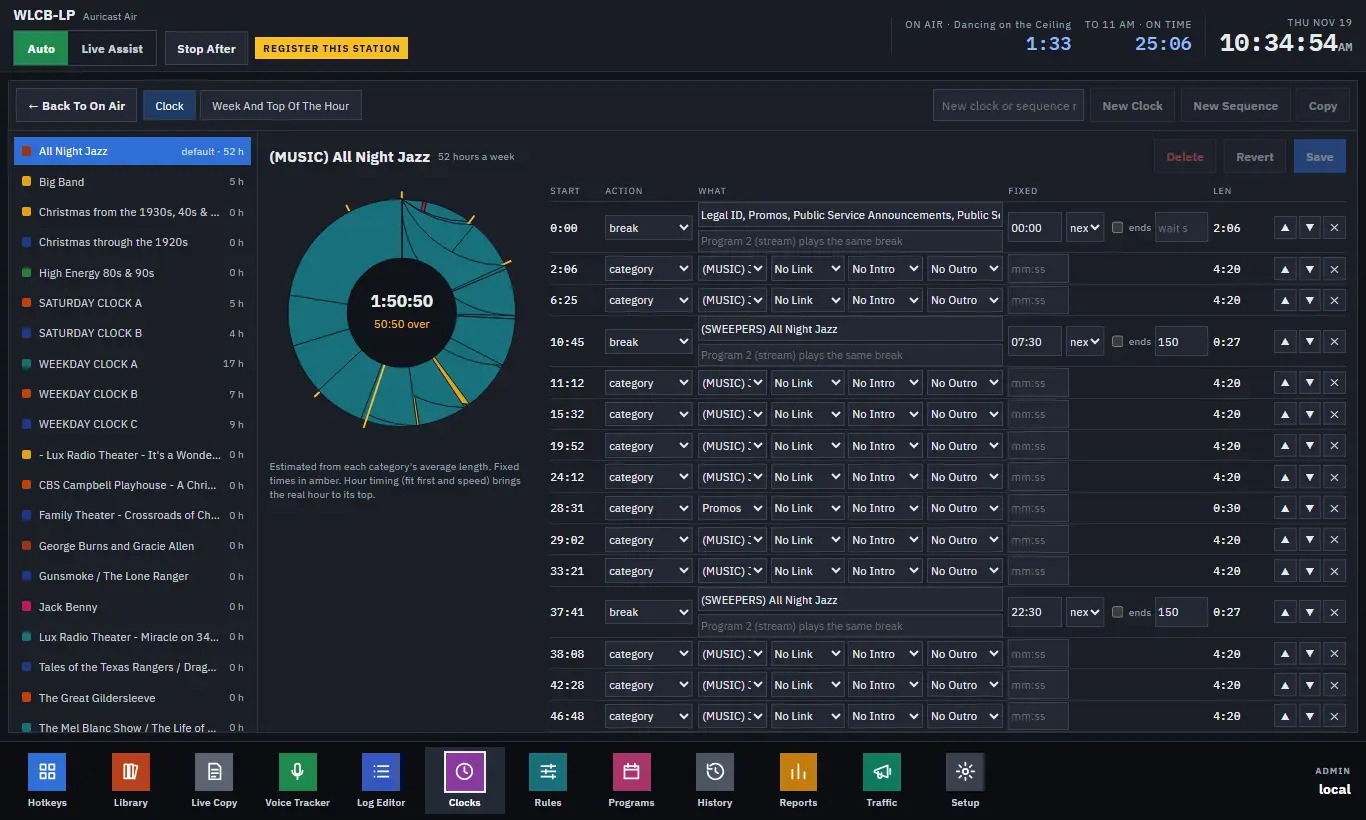
Voiceovers matched to the song
A category step can carry three voiceover categories. Each is a category of short recordings that you name, and Auricast picks the one that fits the song.
| Choice | What it does |
|---|---|
| Intro | Plays over the song's intro ("Here's Fleetwood Mac"). |
| Outro | Plays after the song ("That was Fleetwood Mac"). |
| Link | Plays before the intro, or before the song, as a connector. |
An outro on one step plus a link and intro on the next makes a combo: outro, connector, intro.
The song is picked first; then the voiceover is matched to it. A voiceover's title or file name equal to the song's title is the best match, then the artist, then the year, then the category. Differences of punctuation and case are ignored. Among equally good matches, the voiceover category's own rotation decides.
An intro is placed so the voice ends at the song's Intro marker; the song is dipped to the station's duck level under it. A voiceover longer than the song's intro is not used. A song with no Intro marker gets the voice just before it. So good markers matter (Markers).
Beds
A bed is a music category played under a voice. Choose it in the Bed drop-down on an outro, an announcement, a voice track slot, an Up Next or a hooks step.
The bed starts with the voice, sits under it at the station's duck level, and fades out over 1.5 seconds as the voice ends. Auricast picks a bed at least as long as the voice and its fade. If none is long enough, the voice plays alone, and it is logged. A saved hour keeps a bed's files but not its overlap.
Up Next
The upnext step plays a voiceover that names the next hour's program: "Coming up at 7, Swing Time". Choose the category of voiceovers (and an optional bed). Auricast picks the one whose title or file name contains the next hour's program name, taken from the clock's Program, or else its name.
Voice track slots
The voicetrack step is the place where a recorded voice track plays between songs. The voice tracks themselves are recorded in the Voice Tracker. In the Log Editor you can also add a slot before any item or at the end of a saved hour. A slot with nothing recorded is skipped on air.
Hooks
The hooks step plays short clips of songs that are about to play, back to back, as a teaser. Set how many (1 to 10) and the seconds each (2 to 30; 6 by default), and optionally a bed.
Each clip is the hook of the next song coming up that has one: it plays from the song's Hook marker for the hook's length (never more than the seconds you set), at the song's loudness. A song with no Hook marker is passed over. So the clips are always songs that will really play. If no song coming up has a hook, the clip is left out at once and logged, never replaced by silence.
Set hooks in the marker editor (Markers). Hooks are also read from StationPlaylist's and mAirList's tags where those files have them.