 Auricast Manuals
Clocks
A clock is the plan for one hour. Open the Clocks module to build them. Program Directors and Admins can edit; Operators can look.
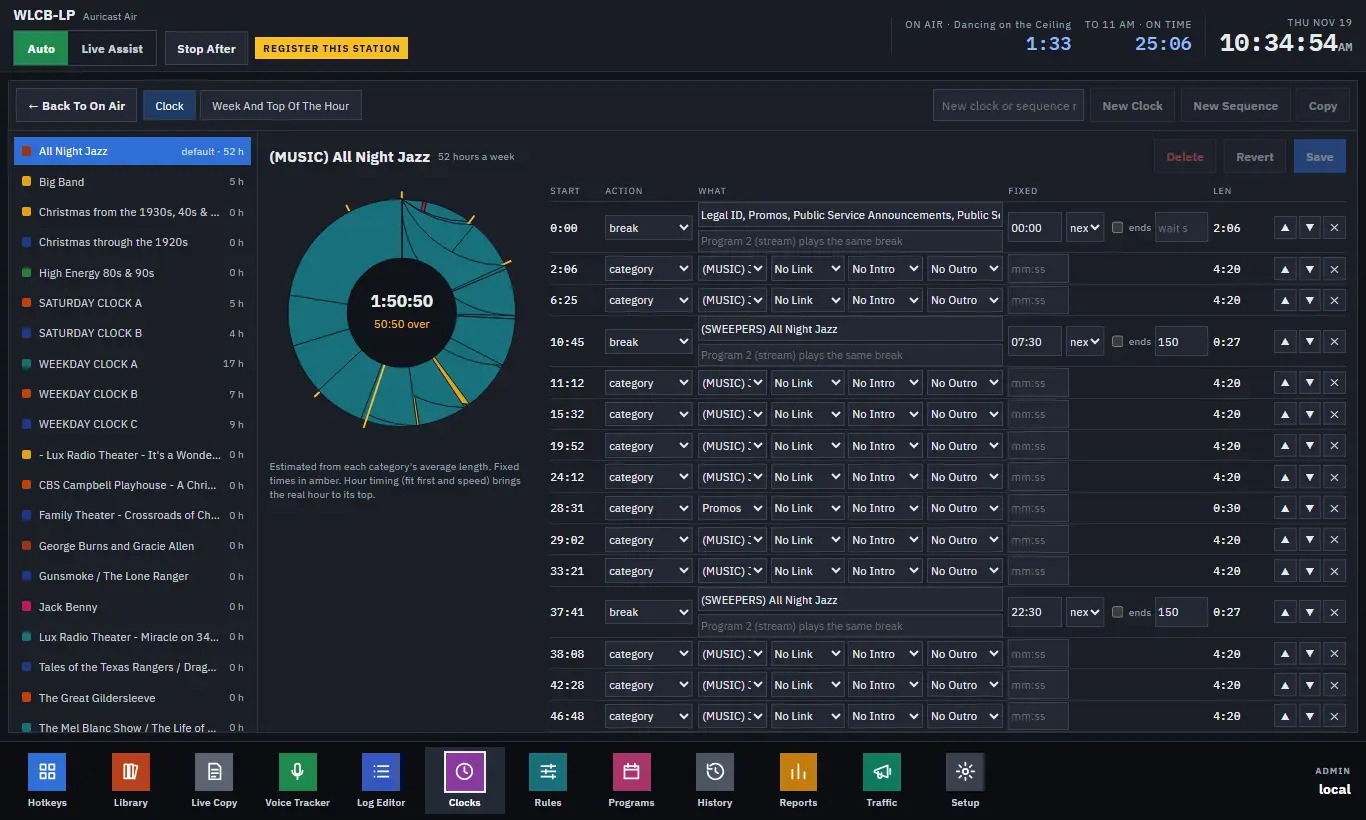
The screen
- The list on the left shows each clock with the hours a week it is used. The default clock is marked.
- The hour wheel shows the steps as colored segments sized by their estimated length. Fixed times are marked in amber. In the middle is the total length and whether the hour is over or under 60 minutes.
- The table on the right has one row per step: START (estimated), ACTION, WHAT, FIXED and LEN.
Lengths are estimates. A category step counts as the category's average track length, a file as its own length. They are re-worked a moment after each change.
Making and editing clocks
- Type a name and click New Clock, or select a clock and click Copy to start from it.
- Change a step's kind in its ACTION drop-down, then fill in the WHAT fields.
- Use the up and down buttons to reorder, the cross to remove, and the Add: buttons to add a step of any kind.
- Save writes the clock. Revert drops your changes. Auricast checks that the clock can be read before saving, and keeps the previous version as a backup.
- Delete works only on a clock that is not used anywhere (not in the week, not a dated hour, and not the default).
Program names the show a clock belongs to. Clocks that share a program name are one program on the Programs screen (Programs).
The step kinds
The Add: buttons show these names in lowercase.
| Step | What it does | Page |
|---|---|---|
| category | One track from a category, chosen by the rules. | below |
| break | Several items in a row, each from a category (a legal ID, a promo, spots). | below |
| file | One named file from the library. | below |
| sequence | A saved run of steps used by name. | below |
| latest, series, join, date_pick, pair | Content from outside, rotated episodes, today's track, two by one artist. | Steps That Play Audio |
| record, studio, udp, tcp, script, http, note | Actions and notes that play nothing. | Actions and Break Notes |
| announce | The time, date or temperature in words. | Announcements, Voice Sets and Weather |
| voicetrack | A slot for a recorded voice track. | Voiceovers, Beds, Up Next and Hooks |
| upnext, hooks | Voice teasers for the next show and for coming songs. | Voiceovers, Beds, Up Next and Hooks |
category
Pick the category. The rules then choose the track. A category step can also carry a Link, Intro and Outro voiceover category and a Bed under the outro (Voiceovers, Beds, Up Next and Hooks).
break
A break plays several items back to back. Type the categories in order, separated by commas: Legal ID, Promos, Public Service Announcements. A break is planned and played as a whole.
For spots from the traffic system, put a spots slot in the list: [Spots 2] for two spots, [Spots 1 or PSAs] to use a category as filler when no spot is due, or [Spots 1 or skip] to leave it out. See the Traffic Manager manual for how spots are scheduled.
The second box, Program 2 (stream) plays the same break, is for a split break: if the station's stream (Program 2) should hear something different from the air chain during a break, enter it there. It is fitted to the break's length. Left empty, the stream plays the same break.
file
Type the path of one file within the library. Use it for a fixed sweeper or a station ID.
voicetrack
A slot where a voice track recorded in the Voice Tracker plays between songs. If nobody records one, the slot is skipped on air. You may add a Bed category to play under it.
sequence
A sequence is a run of steps used as one step, such as a "TOTH Break" (the top-of-hour break). Make one with New Sequence; it is listed under Sequences and edited exactly like a clock. Then add a sequence step in any clock. Change the sequence and every clock that uses it changes. Rules:
- A sequence has no hour of its own, so it cannot go in the week grid.
- Steps inside a sequence take no fixed times; give the fixed time to the sequence step in the clock, and it goes to the sequence's first step that plays.
- A sequence may use other sequences, but not itself. A sequence in use cannot be deleted; Auricast names the clocks that use it.
- Hours already saved in the Log Editor keep what they had.
Fixed times and the clock's own settings
The FIXED column and each clock's own top-of-the-hour settings are covered in Fixed Times and Hour Timing. Which clock runs when is in The Week Grid, Dated Hours and Timed Events.